 中国 (简体中文)
 UK (English)
 ES (Espanol)
 FR (Francais)
 DE (Deutsch)
 NL (Nederlands)
Compressor room monitoring to prevent savings drift after upgrades
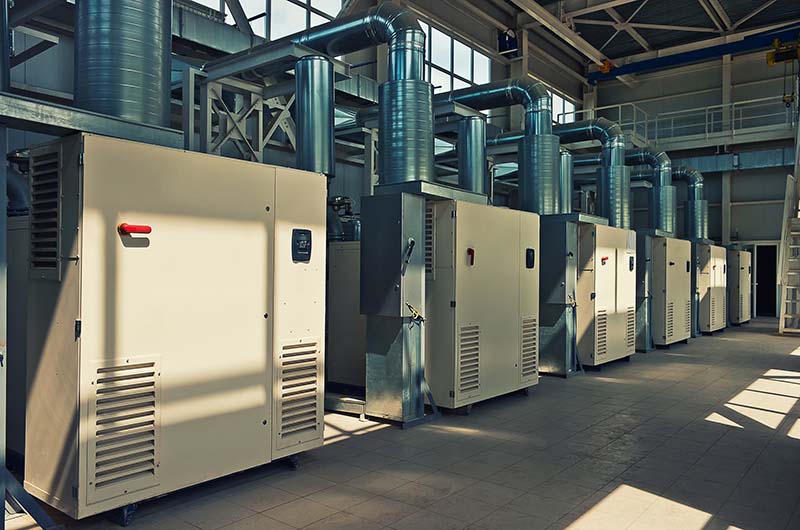
Compressor room monitoring is the difference between “savings at commissioning” and “savings that still show up on the energy bill years later.” Most plants can point to a compressor room upgrade that looked excellent on day one, then quietly lost performance as settings, demand, and equipment condition changed. If you need a quick refresher on where to place sensors and what good measurements look like, watch our webinar Get your flow measurement right.
Compressor room monitoring: why upgrades lose savings after commissioning
Common upgrades such as new controls, a redesigned room layout, or tighter pressure-band tuning can reduce power immediately. The problem is that compressed air systems are dynamic: production profiles change, maintenance practices vary, and small parameter adjustments accumulate. Without ongoing visibility, the system slowly returns to old habits while nobody notices, because the air supply still “works.”
After commissioning, responsibility often shifts from project teams to operations. The optimization logic may remain, but setpoints and sequencing can be changed to solve short-term complaints, like “low pressure at the far end.” In parallel, leaks, drains, filters, and failing end-use regulators increase demand, and the control system responds by running more compressor hours.
The result is a familiar pattern: power creeps up, pressure is higher than necessary, and additional compressors run more often. Because the drift happens gradually, it is rarely flagged until the plant compares utility costs year over year, or the compressor service provider reports unexpected running hours.
What “drift” looks like in a compressor room
Drift is not a single failure; it is the slow loss of the operating point you commissioned. The most common sign is setpoints creeping up over time. A 0.2 bar increase may look harmless, but it can raise the energy required per unit of air and can also increase leakage flow because leakage is pressure dependent.
Another drift signature is extra compressors running “just in case.” A system that was stable on one trim compressor and one base-load unit may end up with a second trim machine cycling, or a backup compressor left in auto. This often happens after maintenance events, control updates, or when minimum pressure is increased to mask local restrictions.
Leakage growth is a quiet driver of consumption drift. A few new leaks, failed automatic drains, or open blow-off nozzles can add a constant base load that forces a compressor to run overnight or during weekends. If nobody tracks flow versus production hours, the plant may accept this as normal.
Unstable control is also a form of drift. Wide pressure swings, frequent load/unload cycling, and rapid changes in compressor status indicate that the control band is poorly tuned, or that measurement signals are incorrect. Instability increases wear and can raise energy use because compressors spend more time in inefficient operating states.
A simple routine to prevent the “5 years later” surprise
Good compressor room monitoring is mostly about timing and consistency: measure before you change anything, confirm the result quickly, and then keep a lightweight monthly check. This does not require a full-time analyst, but it does require reliable flow, pressure, and power data that is easy to compare. To avoid confusing measuring data, align your team on which flow values to use and how they are calculated, review mass flow and calculations.
Start with a baseline at least one week before the upgrade, and include a representative mix of production and non-production hours. Capture per minimum main header flow, flow and pressure at the compressor discharge and at key points in the plant, plus compressor power. This baseline gives you a reference for demand profile, leakage level, and specific energy in kW per m3/min (or kW per m3/h) at actual conditions.
Then run a verification period in weeks 1 to 4 after commissioning. This is when drift begins, because operators and maintenance teams interact with the new controls and respond to the first complaints. During this window, confirm that the new pressure band suits operation and if so that it is maintained, that sequencing behaves as intended, and that total flow at equal production output has decreased or stayed stable.
Finally, implement monthly checks with alarms for abnormal consumption. The goal is not to review every compressor event, but to catch early warning signals: rising weekend flow, higher average pressure, more compressors online, or a worsening specific energy trend. Even a 30-minute monthly review, backed by automatic alerts, can preserve savings.
- Baseline before changes: at least 7 days of flow, pressure, power, and operating states
- Verification weeks 1–4: confirm pressure band, sequencing, and specific energy under similar production
- Monthly review: compare to baseline, check weekend/night demand, and validate alarms and sensors
- Alarm rules: trigger on higher-than-expected flow at low production, pressure setpoint changes, or unusual power per unit of air
What to measure, where to measure it, and how to act on results
The core measurements are flow, pressure, power, and specific energy. Flow indicates demand and leakage; pressure shows whether the system is being run higher than necessary or has distribution losses; power reveals what you pay for; and specific energy links the two so you can see efficiency degradation. Specific energy is most meaningful when calculated consistently and trended over time, not as a single snapshot.
For locations, start at the main header because it represents the plant’s total consumption and is the best place to detect leakage growth and production-driven demand changes. Add compressor room measurements to understand what the supply is doing: discharge pressure, delivered flow per compressor (if available), and total power. Then add critical production branches where pressure complaints originate, such as packaging lines, instrument air manifolds, or high-flow tools, so you can separate real demand changes from distribution issues.
In practice, plants often discover that “low pressure in the area” is caused by a local restriction, not a lack of compressor capacity. If you only monitor in the compressor room, operators may raise the overall setpoint to fix a local problem. With branch monitoring, you can maintain a lower, efficient header pressure while fixing the root cause in the distribution or end-use regulators.
Choose instruments that match the pipe and installation constraints. For fast troubleshooting or temporary campaigns, an insertion-style flow meter can be installed without major downtime, and it can be moved between branches as needed. The VPFlowScope is designed for compressed air and can measure flow and pressure at the same point, making it suitable for both baselining and continuous installations.
Power should be measured per compressor and, if possible, for dryers and auxiliary equipment that impacts total energy. If you do not have power data, you will end up relying on running hours or nameplate assumptions, which can miss partial-load inefficiency and control instability. A practical option is a dedicated meter such as the 3-phase power meter to capture real kW and enable specific energy trends.
Once measurement points are in place, the actions become straightforward. If main header flow is high during non-production hours, prioritize leak detection and verify that condensate drains and blow-offs are not wasting air. If average pressure is rising, check whether the setpoint changed, whether remote pressure sensing is correct, and whether filters or dryers are creating extra pressure drop.
If specific energy worsens while flow stays constant, investigate compressor control behavior and part-load operation. A common culprit is multiple compressors competing as trims, causing excessive unload time or frequent cycling. Another is a control sequence that no longer matches the production profile, for example after adding a new line that creates short peaks.
To keep the routine sustainable, make the data easy to see and the alarms hard to ignore. VPVision dashboards and alarms can trend flow, pressure, power, and specific energy, and then notify the team when consumption exceeds expected values for a given time window. This shifts the effort from manual hunting to targeted investigation, and it helps maintain the savings achieved by the upgrade.
Compressor room upgrades deliver the best results when the plant treats commissioning as the start of an efficiency lifecycle, not the end of a project. Establish a baseline, verify the result in the first month, and maintain monthly checks with alarms tied to flow, pressure, power, and specific energy at the main header, compressor room, and critical branches. If you want to set up continuous monitoring that helps prevent drift, use VPFlowScope measurement points and VPVision dashboards to turn compressor room monitoring into a repeatable routine.



